Colorized, multiline input in Python 3.14
Starting with Python 3.13, a new internal module called _pyrepl has been added to Python. It is used for the regular interactive prompt, and allows multiline editing. Python 3.14 adds syntax highlighting.
I thought these features would be great to use in my own program, an rpn calculator modeled after the classic unix dc.
Since _pyrepl is an internal module to Python, it's not intended for use by scripts. But, they can't stop us! Here's what I've learned...
Basics: Multiline editing
The dc language denotes strings with balanced square brackets, so that [x [a b] w] is a string. In terms of multiline editing, we want input to continue when there is an unbalanced open bracket character.
Here's a simplistic implementation of a function which checks some input to find out whether it's balanced:
def count_brackets(s):
    return s.count("[") - s.count("]")
However, what we need is a true-or-false predicate. In Python zero is false and nonzero numbers are true so we could use count_brackets directly, but I also wrote an actual predicate:
def more_lines(s):
    return count_brackets(s) > 0
Now, we can go ahead and do some multiline input:
from _pyrepl.readline import multiline_input
while True:
    try:
        statement = multiline_input(more_lines, ps1, ps2)
    except EOFError:
        break
    print(repr(statement))
A session with this program might look like so:
pydc> 3 3 +
'3 3 +'
pydc> [a [
  ... b]
  ... c]
'[a [\nb]\nc]'
Advanced: Syntax colorization
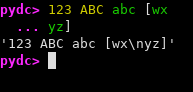
From Python 3.14, the Python repl colorizes Python code. We can repurpose this for highlighting our own syntax rather than Python syntax.
In Python 3.14, it's necessary to monkey-patch the function _pyrepl.reader.gen_colors. In Python 3.16 alphas, that doesn't work. Instead, it is required to update the gen_colors property of the reader object. Happily, the same gen_colors routine works in the same way in each version.
gen_colors generates a sequence of ColorSpan objects. The span member is an inclusive range of characters, and the tag must be one of several predefined python syntax elements.
Rather than fully highlighting the dc language, I'll show a simple gen_colors implementation, which colors digits and uppercase letters the way pyrepl shows numbers, lowercase letters the way pyrepl shows strings, and everything else in the terminal default color:
if hasattr(_pyrepl.utils, 'ColorSpan'):
    from _pyrepl.utils import ColorSpan, Span
    import _pyrepl.readline

    def gen_colors(s):
        for i, c in enumerate(s):
            if c in string.ascii_lowercase:
                yield ColorSpan(Span(i, i), "string")
            elif c in string.digits or c in string.ascii_uppercase:
                yield ColorSpan(Span(i, i), "number")
            else:
                yield ColorSpan(Span(i, i), "reset")

    reader = _pyrepl.readline._wrapper.get_reader()
    if hasattr(reader, 'gen_colors'):
        reader.gen_colors = gen_colors
    else:
        import _pyrepl.reader
        _pyrepl.reader.gen_colors = gen_colors
It's worth noting that the builtin gen_colors also takes care to emit fewer spans whenever possible, something I ignored for this example.
Advanced II: Showing messages
Pyrepl includes support for an area below the entry area. This is for showing completions, but you can use it to show whatever you like.
This is done by monkeypatching the reader object's after_command:
reader = _pyrepl.readline._wrapper.get_reader()
original_after_command = reader.after_command
def after_command(self, cmd) -> None:
    original_after_command(cmd)

    if cmd.finish: return

    buffer = "".join(self.buffer)
    msg = repr(buffer)
    if msg != self.msg:
        self.msg = msg
        self.dirty = True
reader.after_command = lambda cmd: after_command(reader, cmd) # fake instance method
This has the effect of continuously previewing what will be shown after hitting enter.
The code
Putting it all together, here's the full script:
Entry first conceived on 20 June 2026, 13:45 UTC, last modified on 8 July 2026, 3:04 UTC
Website Copyright © 2004-2024 Jeff Epler